
GitHub Releases To Discord Action
A GitHub Action that sends a stylized Discord webhook containing the description of a GitHub Release to a specified Discord channel. It formats the description to improve readability and includes various configuration options to customize the message.
Features
- Formats release descriptions by:
- Removing carriage returns and HTML comments.
- Styling headers for better readability in Discord (optional).
- Cleaning up redundant whitespace and newlines.
- Converting common GitHub links (e.g., PRs, Issues) into clickable URLs.
- Limits description length to avoid exceeding Discord's character limits.
- Provides customization for the Discord message, including:
- Webhook URL, message color, footer text/icon, and timestamp.
- Username and avatar for the webhook.
- Optional message content outside the embed.
Output

Configuration
| Variable | Required | Default | Description |
|---|---|---|---|
| webhook_url | ✔ | Discord's webhook url. Use GH repo secrets. | |
| color | ❌ | "2105893" | Decimal color value for embed. |
| username | ❌ | String username for webhook. | |
| avatar_url | ❌ | String url to webhook avatar picture. | |
| content | ❌ | String content for webhook. | |
| footer_title | ❌ | String title for the webhook footer. | |
| footer_icon_url | ❌ | String url for the webhook footer picture. | |
| footer_timestamp | ❌ | Boolean to enable footer timestamp. | |
| max_description | ❌ | "4096" | Max length for the description. |
| reduce_headings | ❌ | false | Converts H3 to bold, h2 to bold & underline. |
Example Usage
.github/workflows/github-releases-to-discord.yml
on:
  release:
    types: [published]

jobs:
  github-releases-to-discord:
    runs-on: ubuntu-latest
    steps:
      - name: Checkout
        uses: actions/checkout@v3
      - name: Github Releases To Discord
        uses: SethCohen/github-releases-to-discord@v1
        with:
          webhook_url: ${{ secrets.WEBHOOK_URL }}
          color: "2105893"
          username: "Release Changelog"
          avatar_url: "https://cdn.discordapp.com/avatars/487431320314576937/bd64361e4ba6313d561d54e78c9e7171.png"
          content: "||@everyone||"
          footer_title: "Changelog"
          footer_icon_url: "https://cdn.discordapp.com/avatars/487431320314576937/bd64361e4ba6313d561d54e78c9e7171.png"
          footer_timestamp: true
          max_description: '4096'
          reduce_headings: true
Setup Instructions
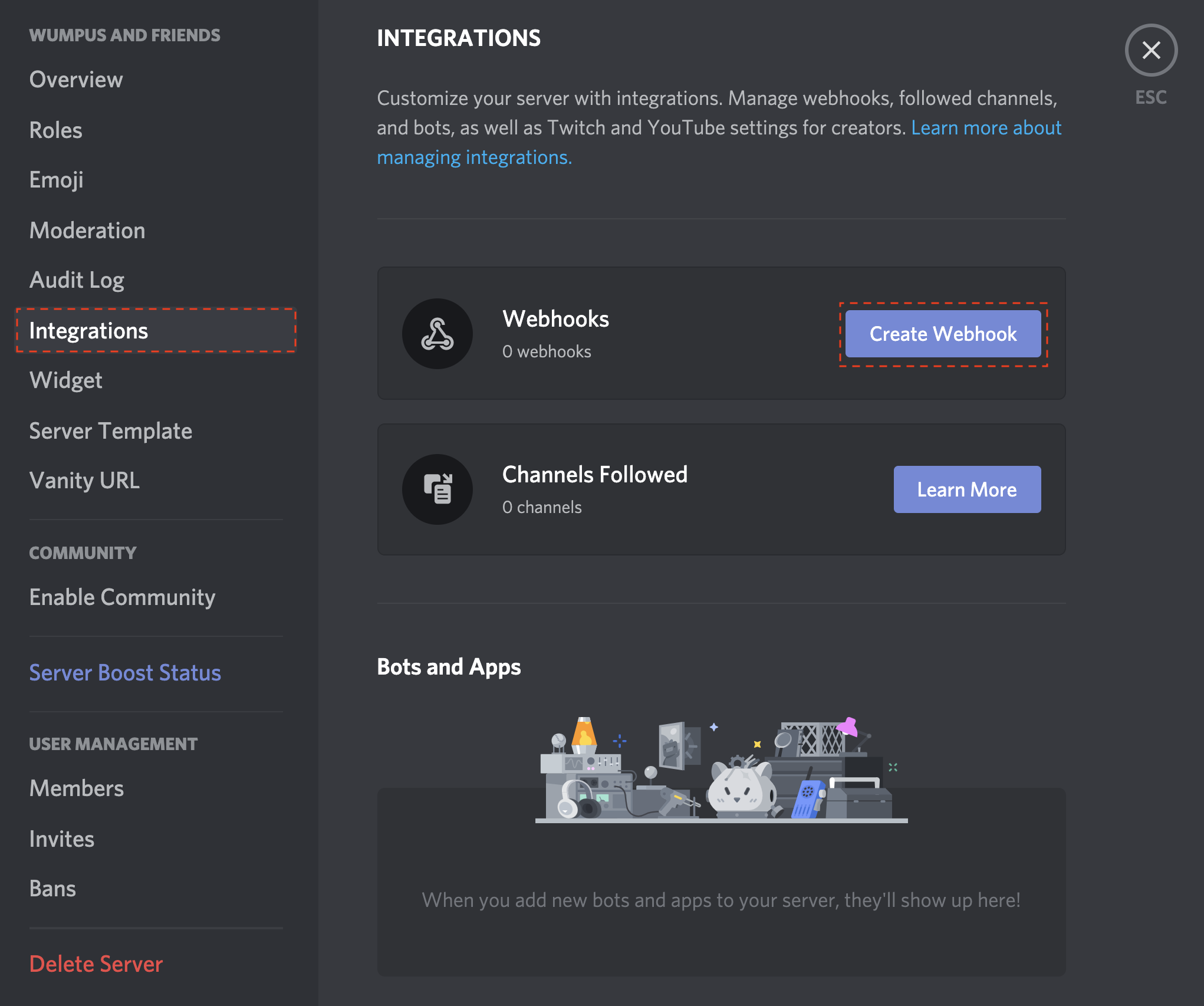
- Open your Server Settings and head into the Integrations tab:
- Click the "Create Webhook" button to create a new webhook!
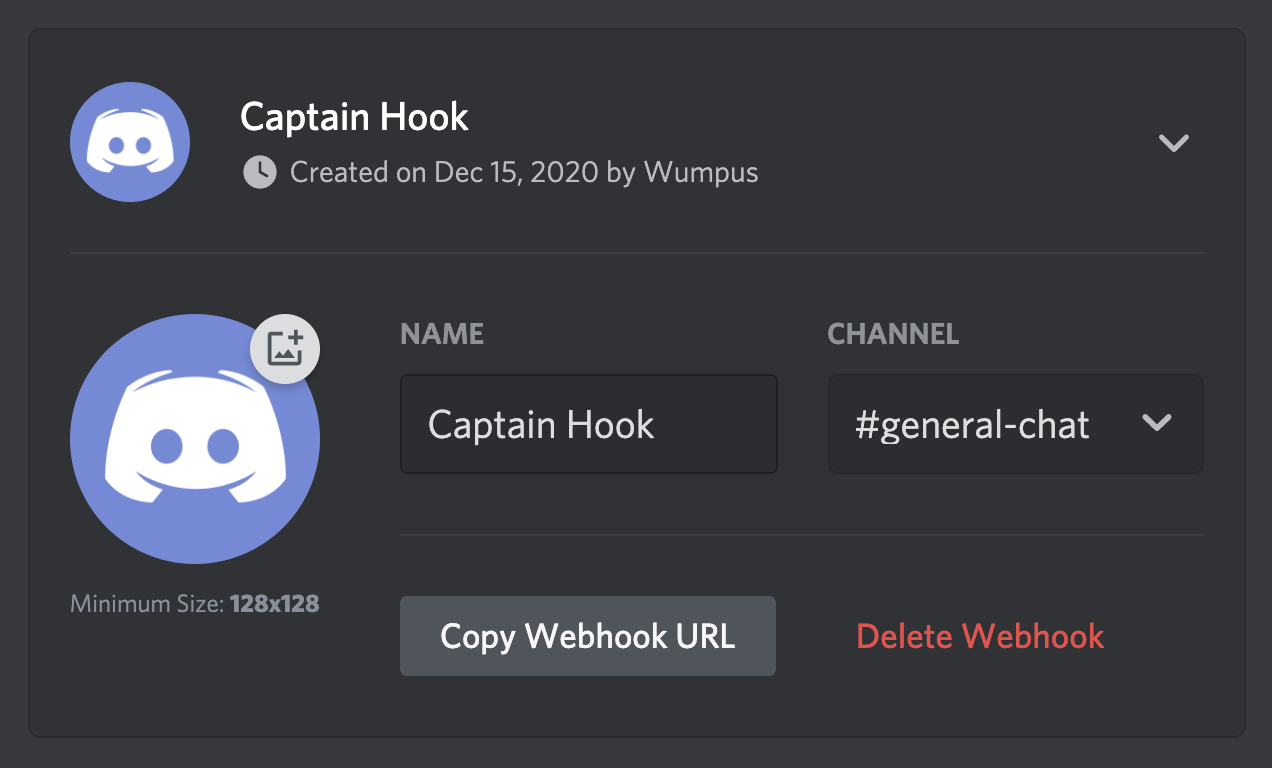
- Copy the webhook url
- Create a new GitHub repository secret called WEBHOOK_URL and paste the webhook url into it.

- Save the secret.
- Add the secret to your action configuration.
And you're done! Whenever you create a new release, the workflow should run and, if properly setup, post to your specified Discord channel.
Contributing
If you have suggestions for how GitHub Releases To Discord Action could be improved, or want to report a bug, open an issue! We'd love all and any contributions.
- Fork the repository.
- Install node and run
npm install. - Install Github Action tester
act - Create a sample test Release file to simulate a webhook payload object such as
tests/sample-test-release.jsonwith the following structure:
{
  "action": "published",
  "release": {
      ...
  },
  "repository": {
      ...
  },
  "sender": {
      ...
  }
}
This file will be used to test the action locally and simulate a real release event webhook payload. Refer to the GitHub Webhook documentation and the Github API Documentation for more information on the webhook payload structure.
-
Fill the test json file with the necessary fields to simulate a release event.
-
Create a test file called
.envin the main root of the project with the following environmental variables:
  INPUT_WEBHOOK_URL=
  INPUT_COLOR=
  INPUT_USERNAME=
  INPUT_AVATAR_URL=
  INPUT_CONTENT=
  INPUT_FOOTER_TITLE=
  INPUT_FOOTER_ICON_URL=
  INPUT_FOOTER_TIMESTAMP=
  INPUT_MAX_DESCRIPTION=
  INPUT_REDUCE_HEADINGS=
- Fill the
.envfile with your chosen environmental variables values. - Create a Discord webhook in your server, making sure to add the webhook url to the
.envfile underINPUT_WEBHOOK_URL=. - Run the action locally with
act release -e <your.json>(e.g.act release -e tests/sample-test-release.json) and check the output in your Discord server. - Confirm that the action works as expected.
- Make your changes and commit them:
git commit -m '<commit_message>'. Please follow Conventional Commits. - Create the pull request.